

Login
Purchase products from our website and enjoy Free Shipping.

Poduct Detail

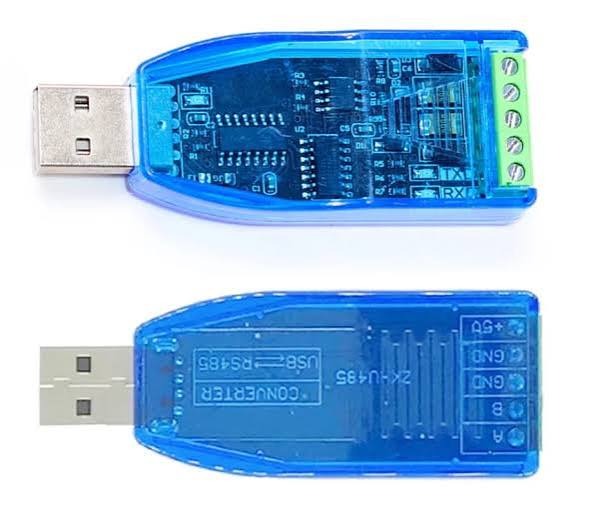
usb to 485 conveter in Pakistan
KHREED.PK
Rs. 0
In StockSKU:
Categories & Tags: Computers & Laptops, Computer Accessories, Adapters & Cables, Imported, Pakistan, Discount, High Quality
Share:
Features:
Usb to rs 485 converter
Pin 1 (A) → Connect to the A (D+) terminal of the RS-485 device.
Pin 2 (B) → Connect to the B (D-) terminal of the RS-485 device.
Pin 3 (GND) → Optional signal ground. Connect if your RS-485 device has a GND terminal and communication is unstable.
Pin 4 (GND) → 5V power ground (only if you want to power an external device from the adapter).
Pin 5 (+5V) → 5V output from the USB port (optional, for powering low-power external devices).
Basic connection
USB to RS485 RS485 Device
-----------------------------------
A -----------------> A (D+)
B -----------------> B (D-)
GND (optional) ------> GND
Steps
Plug the adapter into your computer.
Install the USB driver if needed (often CH340, FTDI, or CP2102 depending on the chipset).
Note the COM port assigned in Device Manager (Windows).
Open your serial communication software (such as Modbus Poll, ModScan, or a serial terminal).
Set the correct baud rate, parity, stop bits, and slave address to match your RS-485 device.
Description:
Usb to rd 485 converter
Pin 1 (A) → Connect to the A (D+) terminal of the RS-485 device.
Pin 2 (B) → Connect to the B (D-) terminal of the RS-485 device.
Pin 3 (GND) → Optional signal ground. Connect if your RS-485 device has a GND terminal and communication is unstable.
Pin 4 (GND) → 5V power ground (only if you want to power an external device from the adapter).
Pin 5 (+5V) → 5V output from the USB port (optional, for powering low-power external devices).
Basic connection
USB to RS485 RS485 Device
-----------------------------------
A -----------------> A (D+)
B -----------------> B (D-)
GND (optional) ------> GND
Steps
Plug the adapter into your computer.
Install the USB driver if needed (often CH340, FTDI, or CP2102 depending on the chipset).
Note the COM port assigned in Device Manager (Windows).
Open your serial communication software (such as Modbus Poll, ModScan, or a serial terminal).
Set the correct baud rate, parity, stop bits, and slave address to match your RS-485 device.

CONTACT INFORMATION
CALL
+92 318 04500 11
FIND US
Lahore Pakistan
Info@Khreed.pk
sales@Khreed.pk